Cyber Security Basics
Advantages:
- Protection against unwanted software
- Maintain privacy and secure data
- Preserving valuable resources
- Keeping cyber space safe and clean
Limitations:
- Costly
- Bad Configuration = disaster
- Difficult to choose right solution
- unawareness
- makes things slower
Skills:
- 5. How_to_Become_a_Hacker
- Art of Googling and AI
- At least one professional certification
- Strong Cryptography skills
- Strong Social Engineering skills
- Patience + out-of-the-box thinking
- Always updated and optimistic
Vulnerability Research
-> White box approach to software testing
Steps:
- Fuzzing and reverse engineering
- Network & Protocol analysis
- Cryptography
- Web Application, API's and Mobile apps
- Hardware analysis
-> deriving concept from known attack and applying statistically for current system
-> periodic operations helps to mitigate security attacks
-> helps to reduce zero-day exploits
OS: Linux
- Open Source, Cross Platform OS
- Derived from UNIX OS, modified by Linus Torvalds
- Developed and Launched in 1991, one of most used Kernel
- Runs on everything
- UNIX shell based environment, just a kernel
Evolution:
-> UNIX: project started in 1969, Bell Laboratories, in C
-> Commercial use, closed source
-> 1991, Torvald wrote his own UNIX, made freely available
-> 1992, GNU GPL, not available for commercial use
-> modified and many flavours released
Distributions:
Ubuntu:
-> Debian based, uses GNOME DE
-> most known Linux distribution
Linux Mint:
-> Irish distribution, based on Ubuntu
-> highly stable, full multimedia compatability
Debian:
-> Base for many other distributions (eg: Ubuntu, Kali Linux, MX Linux)
OpenSUSE:
-> Beautiful Desktop experience
-> KDE environment
CentOS:
-> Optimised for server environments
-> Package development and server testing, robust
Fedora:
-> Continuation of an older distribution "Red Hat Linux"
-> used in workstations, advanced and enterprise use
Advantages:
- Open Source
- Security
- Legacy Support
- Portable
- Flexible
- Software Updates
- Customizations
- Free of cost
- Various flavours
- Community
- Performance
- Fast and easy
Linux for Penetration Testing:
Kali Linux:
-> Developed by Offensive Security as the rewrite of BackTrack
-> 500+ preinstalled tools
Parrot Security:
-> Debian based, developed by Frozenbox's team
-> Cloud friendly, lightweight
-> Highly customizable, strong Community Support
BlackArch Linux:
-> Arch based
-> Window manager preconfigured
-> contains over 1800 tools
BackBox:
-> Ubuntu based
-> Complete DE
Penetration Testing
-> An authorized simulated cyberattack on a computer system
-> To evaluate the security of the system
-> Automated/Manual
-> Checking compliance requirements, its employee's security awareness and the organization's immunity towards security incidents
-> Domain knowledge is more at expert level
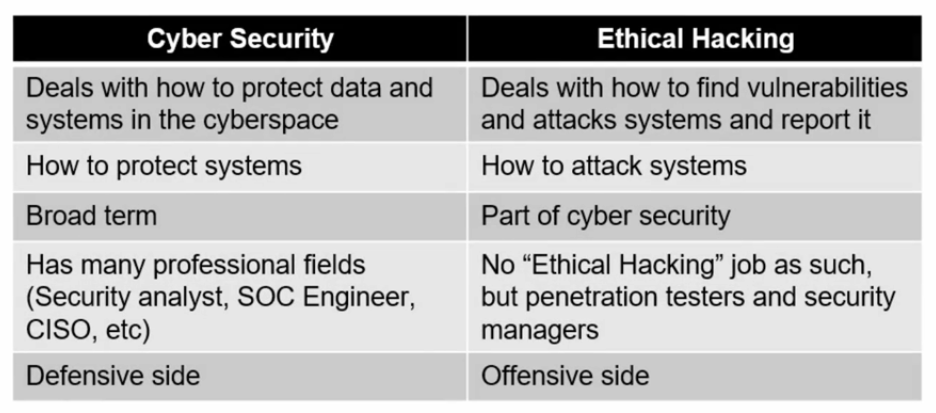
-> Ethical hacking= learning, Penetration testing= implementing
Phases:
- Pre Engagement : meeting with client to have crystal understanding of their needs and vision
- Planning & Recon: Test plan generation and public information gathering through scanning
- Threat Modelling & Vulnerability Identification: Model of all the security concerns and ranking vulnerability severity
- Exploitation: Gaining access
- Post Exploitation: value determination of assets compromised and further attack propagation
- Reporting: Detailing vulnerabilities found, stating impact and remedies
- Resolution & Re-Testing: Resolving the issues and verify the fixes
Cyber Security vs Ethical Hacking
Setup
-> You can dual boot or use virtualization
Virtialization Softwares: VMWare or VirtualBox
- Download VMware or VirtualBox
- Download Kali linux iso file
- Boot into kali
Dual Boot vs Virtual Machine
Dual Boot
-> Splitting your computer's resources between the two operating systems
-> Each one will have its own dedicated partition on the same hard drive on the same hard drive or an external drive
-> You can't run both OS simultaneously
Advantage
- Access to fully dedicated hardware resources like CPU, RAM, etc
- Perfect for running resource-intensive tasks and programs
Disadvantages
- Installation process is complex
- You have to restart everytime you need to change OS
Virtual Machine
-> Dedicated virtual environment within your OS allowing you to simultaneously run two or more OS
-> Need a virtualization software and ISO file
Advantage
- Easy to setup
- Sandboxed
- Extra layer of security against malware and security vulnerabilities
- Can create snapshots of OS
- Able to move to one computer from another
Disadvantage
- No dedicated access of resources between OSes
- Inconvenient for resource-intensive tasks
You can choose what you want to use, i prefer hybrid method, where Kali Linux is my host OS and you can use custom labs or Machines on Virtual Machine and hack it from your OS
Network Configuration
- In VM you have 3 different types of Network Configuration
1. NAT (Network Address Translation)
- Just like your home network with a wireless router, the VM will
be assigned in a separate subnet. - Your VM can access outside network like your host, but no
outside access to your VM directly, it's protected. - DHCP is internal
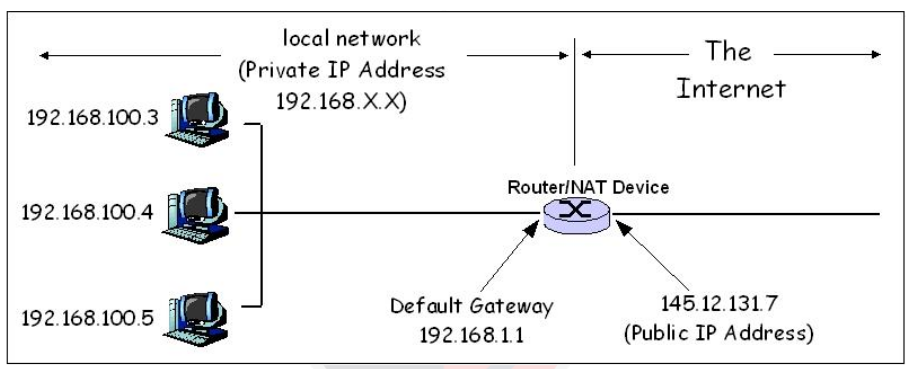
2. Bridged
- Your VM will be on same network as your host
- It can be accessed by all computers as your network
- DHCP is external
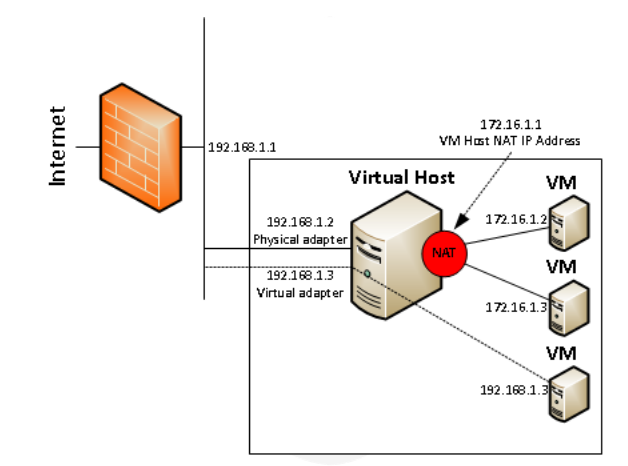
3. Host only
- Host only networking creates a network that is completely contained within the host computer
- All VMs connected to a host-only network will be visible to the host and to each other
LAN Segments
- An internal network which logically divides a private network into network segments, that is completely contained within the Host computer
- All VMs connected to an internal network will be visible to each other but not to host
Must have testing apps
DVWA
-> Damn Vulnerable Web Application
-> Download using sudo apt install dvwa
-> To start you can run sudo dvwa-start or run dvwa-start from application menu
-> Login using default credentials i.e. username: admin & password: password
-> You can access it on http://127.0.0.1:42001/ or port no specified during dvwa startup
-> Create database on that site
-> And you're good to go
-> You can stop it using sudo dvwa-stop or run dvwa-stop from application menu
bWAPP
-> Buggy Web Application
-> Download it from https://sourceforge.net/projects/bwapp/files/bWAPP/
-> Extract it to /var/www/html/
-> Make it executable by running chmod +x /var/www/html/bWAPP
-> Install dependency using ```sudo apt update -y && sudo apt install apache2 mysql-server php php-mysql php-gd php-curl -y```
-> Start web server and database server using ```sudo systemctl start apache2
sudo systemctl enable apache2
sudo systemctl start mysql
sudo systemctl enable mysql```
-> Go to /var/www/html/bWAPP/admin/ open settings.php change password to ""
-> Go to http://localhost/bWAPP/install.php and click on install button
-> If you get error then runsudo mysql -u root -pand when prompted to root@localhost password just hit enteruse mysqlthen `CREATE USER 'username'@'localhost' IDENTIFIED BY 'password';`
and thenGRANT ALL PRIVILEGES ON bWAPP.* TO 'username'@'localhost';thenexit
Note: “username and my_password” can be anything you pick/want
-> Go back to settings.php and set username and password what you picked
-> sudo systemctl restart apache2 && systemctl restart mysql
-> Then http://localhost/bWAPP/install.php
-> This is such a pain in the ass
Metasploitable
-> Run directly on VMware
-> don't use on bridged network config
-> NAT preferable
OWASP Broken Web Applications Project
-> Run directly on VMware
-> don't use on bridged network config
{{Basics+Lab_Setup}}
Module: {{Module Number & Name}}
Date: 05/06/2026
Tags: #pen1 #FUNDAMENTALS #(Basics+Lab_Setup)
🧠 My Understanding (Plain English)
Explain this concept as if talking to a friend. No jargon. If you can't do this — you don't understand it yet. Come back after rewatching.
NAT: VM can access outside, but no one from outside can access VM
Bridged: can be accessed by all computer in same network
Host Only: all will be visible to host and each other
LAN Segment: all will be visible to each other but not to host
⚙️ How It Works (Mechanics)
The actual technical mechanism. What happens under the hood? Think packets, system calls, memory, processes.
Analogy First:
Testing apps: as vulnerable machines
Technical Breakdown:
-
⚔️ Offensive Angle
How does an attacker use or abuse this?
Attack Scenario:
Key Tools:
| Tool | Purpose |
|------|---------|
| | |
Critical Commands:
# What it does — explain purpose before syntax
What makes this attack work:
🛡️ Defensive Angle
How do you detect or stop this attack?
Detection Indicators:
Logs to check:
# What log, what to look for
Mitigation:
🔗 Connections
How does this topic connect to other things you've learned?
- Relates to → 2. Networking_Basics
- Required for →
- Builds on →
❓ Questions & Gaps
Things you didn't fully understand. Come back to these.
- [ ]
- [ ]
🧪 Lab Notes
What you actually did in the lab. Commands run, output observed, what surprised you.
Target/Scenario:
Steps Taken:
1.
2.
3.
Unexpected Behavior / Lessons Learned:
⚡ One-Line Summary
If you had to summarize this entire topic in one sentence — what is it?
Just basics